
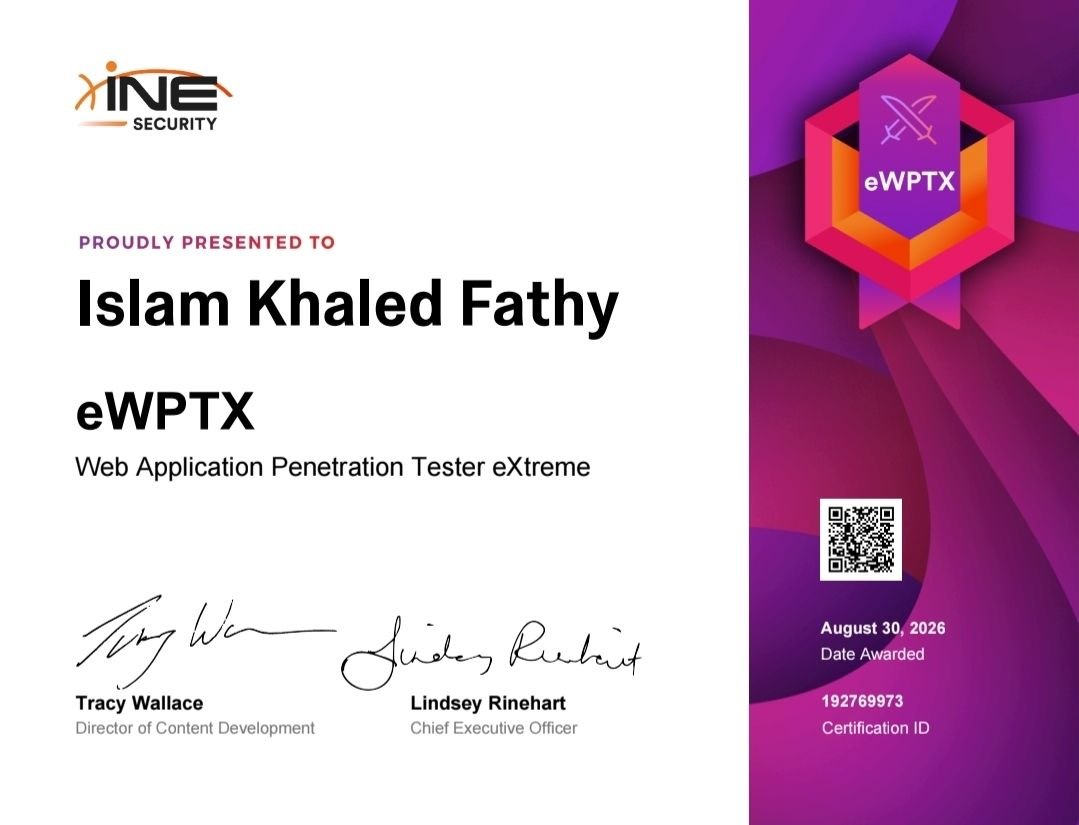
After completing the INE course, working through every relevant PortSwigger lab, and building my own testing methodology and playbooks, I sat the eWPTXv3 (Web Application Penetration Tester eXtreme) exam. Here’s my honest, spoiler-free review of the experience.
The Format
The exam gives you 18 continuous hours against a single live environment simulating a real organization’s staging infrastructure. Unlike the older report-based certifications, there’s no pentest report to submit — you answer a set of questions (multiple choice and short answer) based on what you actually find and exploit in the lab, and grading is automatic right after submission.
There’s no proctoring, and you’re free to use your notes, documentation, and any external resources — including AI tools — as long as you’re doing the actual thinking and testing yourself. That freedom is a double-edged sword: it removes artificial constraints, but it also means the exam expects you to work efficiently and know exactly what you’re looking for, because nobody is going to hold your hand.
The Difficulty
This is not an exam you pass by memorizing payloads. It’s explicitly CVE-based — meaning your ability to correctly fingerprint a technology stack and its exact version, then connect that to a real, documented vulnerability, matters far more than trying to invent something exotic. Several of the questions only make sense once you’ve chained two or three findings together, which means sloppy or incomplete recon early on comes back to bite you hours later.
The range of vulnerability classes covered was broad — think authentication and authorization flaws, injection vulnerabilities across different technologies, insecure deserialization, JWT implementation weaknesses, and information disclosure through misconfigured services. Some challenges resolved quickly once identified; others took real trial and error, especially when standard tooling didn’t behave as expected against a custom-built backend and I had to fall back on manual, scripted exploitation instead.
What Actually Slowed Me Down
Two things, honestly:
- Assuming default environment setups. I went in expecting certain tools and wordlists to be in their usual locations, and some weren’t — the environment had its own layout on the Desktop that didn’t match what I’d prepared for. Lesson: always verify your environment’s actual file structure at the start rather than assuming it matches your notes.
- Tooling doesn’t always “just work.” Automated scanners are great at flagging the obvious, but a couple of times the underlying vulnerability logic was subtle enough that automated detection produced false negatives, and I had to understand the root cause well enough to build a targeted, manual exploitation approach instead.
What Helped Me Most
- Documenting everything as I went, not at the end. Live-updating a findings log and a separate “confirmed answers” log meant I never had to backtrack and re-verify something under time pressure.
- A repeatable recon-to-exploitation checklist, so I wasn’t reinventing my approach for every new host.
- Not getting stuck. If something wasn’t yielding results after a reasonable amount of time, I moved on and came back to it later with fresh context — this alone probably saved me the most time overall.
- Treating every port and service as worth fingerprinting properly, even ones that looked unremarkable at first glance — some of the more interesting findings were on non-standard ports that are easy to overlook.
Practical Tips: Finding Wordlists, Tools, and Structuring Recon
A few practical notes that I think are worth sharing for anyone prepping for a similar exam — these are general good practices, not anything specific to the exam content itself.
Finding wordlists when they’re not where you expect
Don’t assume /usr/share/wordlists/rockyou.txt or any other “standard” Kali path will exist in every environment. Before relying on any wordlist path from your notes, verify it first:
# Search the whole filesystem for a wordlist by name
find / -iname "*rockyou*" 2>/dev/null

# List everything under common wordlist directories
find / -type d -iname "*wordlist*" 2>/dev/null

# Check what's actually on the Desktop (some exam environments stage them there)
ls -la ~/Desktop/

# Use locate if the database is available (much faster than find)
updatedb 2>/dev/null; locate -i wordlist

# Quick sanity check before running a long crack job
wc -l /path/to/wordlist.txt
Get in the habit of running a quick find for wordlists at the very start, before you need them under time pressure.
Tools and commands I leaned on most
A general-purpose toolkit, not tied to any specific target:
# Port and service enumeration
nmap -Pn -p- --min-rate 3000 -oA nmap/full-tcp <target>
nmap -Pn -sV -sC -p <found-ports> -oA nmap/services <target>

# Technology fingerprinting
whatweb <target>
curl -I <target>

# Content and directory discovery
ffuf -u http://<target>/FUZZ -w <wordlist> -mc all -fc 404 -t 40
dirb http://<target>/ <wordlist>

# Manual exploration with curl (headers, verbose output, method testing)
curl -i <target>
curl -i -X OPTIONS <target>
curl -v --max-time 10 <target>

# Password / hash cracking
hashcat -m <mode> <hash_file> <wordlist> --force

# SQL injection (automated first, manual fallback if it fails)
sqlmap -u "<url>" -p "<param>" --batch --level=5 --risk=3

# Git repo dumping if `.git/` is exposed
git-dumper http://<target>/.git/ ./dumped-repo
None of these are exotic — the value wasn’t in knowing rare tools, it was in knowing when to reach for the manual/scripted alternative once the automated tool didn’t behave as expected.
What a solid recon phase should actually cover
Recon is where the exam is genuinely won or lost — rushing it to get to “the fun part” is the single biggest mistake I’d warn against. A structured recon pass should cover, in order:
- Host discovery — confirm what’s actually alive and reachable before doing anything else.
- Full port scan — not just the top 1000 ports. Interesting services often sit on non-standard ports that a quick scan will miss entirely.
- Service and version fingerprinting — get the exact version of every service you find, not just “it’s probably X.” Exact versions are what let you match a CVE later.
- Technology fingerprinting per web app — framework, language, server software, and anything visible in headers, JS files, or error messages. Error messages in particular can reveal the real backend stack even when a port scanner guesses wrong.
- Content and directory discovery — brute-force hidden paths and files, and always check common sensitive paths manually (
.env,.git/, backup files, config files) in addition to running a fuzzer. - JavaScript analysis — for any single-page application, pull every JS file and search it for API endpoints, hardcoded values, and hints about backend routes that aren’t visible from the UI.
- API discovery — check for exposed documentation (Swagger/OpenAPI, GraphQL introspection) before manually guessing endpoint names; documented APIs will often hand you the entire attack surface for free.
- Documentation as you go — record every host, port, service, and version in a running table while you find it, not from memory afterward.
Only after all of that is genuinely exhausted does it make sense to move into active exploitation — jumping straight to exploitation attempts before recon is complete is the fastest way to waste hours chasing the wrong lead.
The Two-Table Documentation System That Kept Me Sane
One of the most valuable things I set up before exam day wasn’t a tool or a payload — it was a simple documentation structure with two separate tables, kept in two separate files. This alone probably saved me more time than any single exploit did.
Why two tables, not one
It’s tempting to keep a single running log of “stuff I found.” The problem is that not every discovery is a usable answer, and not every answer comes from a single finding — sometimes it only appears after chaining two or three separate discoveries together. Mixing “things I’ve found” with “things I’m confident enough to submit” makes your final review before submission much harder, because you end up re-verifying everything from scratch under time pressure.
So I split it into:
1. A Master Vulnerability/Findings Log — every single thing I discovered, confirmed or not, went in here. Roughly structured like this (example data, not real exam content):
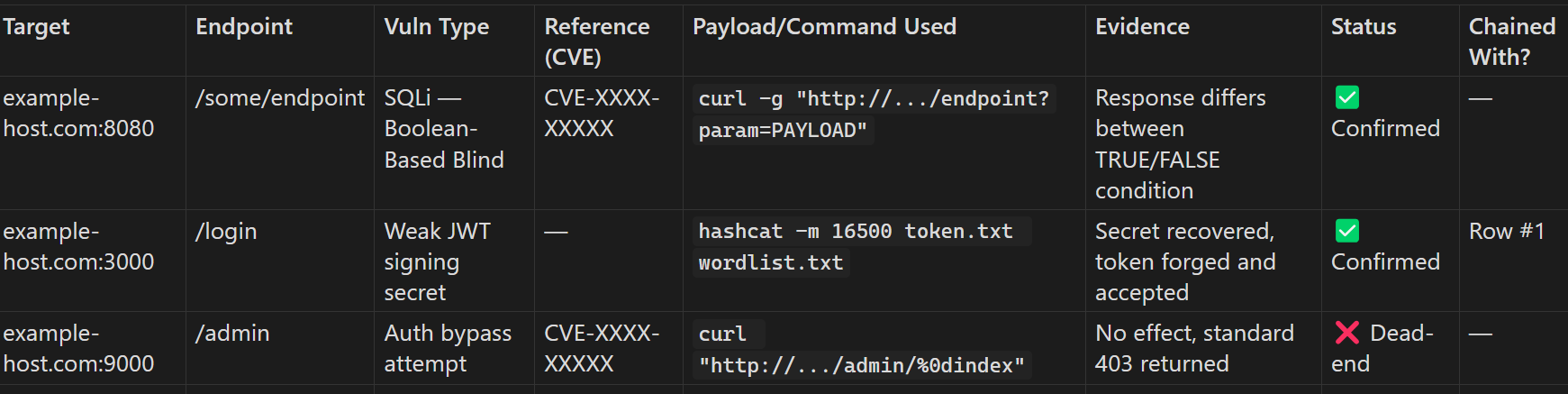
Columns that mattered most:
- Vuln Type — described precisely (e.g. “SQLi — Boolean-Based Blind,” not just “injection”)
- Payload/Command Used — copy-pasted verbatim, not paraphrased, so I could re-run it instantly under time pressure without trying to remember exact syntax
- Status —
Confirmed,Attempted, orDead-end, so I never wasted time repeating a failed approach I’d already tried - Chained With? — a pointer to another row, if the finding was part of a multi-step chain
2. A separate Flag/Answer Log — only entries I was confident enough to actually submit as a final answer, each one linked back to the row that proved it:

The Double-Checked? column only got marked Yes after re-verifying the value right before final submission — nothing got submitted on a single unverified pass.
How this actually helped during the exam
- No re-testing under pressure. When I needed to reproduce something hours later, the exact command was already sitting there — I never had to reconstruct a payload from memory.
- A built-in “don’t repeat this” list. Dead-end attempts got logged too, with a short note on why they failed. More than once I caught myself about to retry something I’d already ruled out, and the log stopped me before I wasted the time.
- Chaining became visible. Some answers only made sense once I could see two rows next to each other and realize they connected. Having everything in one structured table made those connections much easier to spot than scrolling back through scattered notes.
- The final review was fast, not stressful. Instead of scrambling to re-verify everything in the last hour, I just walked down the Flag/Answer table checking off
Double-checked: Yesone row at a time, because every answer already had its evidence linked and ready.
If you take one thing from this review, make it this: document as you go, in a structure that separates “raw findings” from “submission-ready answers,” and never rely on memory to reconstruct something you already figured out once.
Final Thoughts
If you’re prepping for eWPTXv3: build your own methodology before exam day, don’t rely purely on memorized steps, and practice documenting under time pressure — it’s a skill in itself. The exam rewards structured thinking and genuine understanding of why a vulnerability exists, not just how to trigger it.
Thanks to INE for building an exam that actually reflects how web application penetration testing works in practice.
(And yes — 2 coffees, 3 teas, and a mango later, the certification was earned 🤣)
Passed the eWPTXv3 exam — full announcement on LinkedIn.